
What You'll Learn
- How to spot a genuinely free resume builder versus a freemium trap that charges at download.
- Which template structure passes ATS screening — and why single-column layouts outperform multi-column designs.
- How to write resume content that matches job description keywords without stuffing.
- A step-by-step PDF export checklist to verify your resume before sending.
- How a shareable live CV link can replace email attachments in networking and freelance situations.
If you need free resume builder help, this guide gives you a complete, practical path from blank page to finished document. Many users run into freemium paywalls the moment they try to download their resume, or they submit a polished layout and never hear back because an applicant tracking system read it as garbled text.
Getting real support from a free resume-building tool shouldn't feel like navigating a trap. This guide walks you through every step: choosing the right tool, picking a template that fits your industry, writing content that survives automated screening, exporting a print-ready PDF, and sharing your resume with a personalized live link. Every step uses NestCV as the working example — because it is designed to be free from start to finish, no watermark, no credit card at the download button.
Why Free Resume Builders Are More Capable Than You Probably Think
The word "free" carries a lot of skepticism, and for good reason. Most people have encountered a tool that looked free, then revealed a paywall right before the download. Understanding the difference between a freemium trap and a truly free resume maker will save you a lot of wasted effort.
The freemium trap most builders use
The pattern is almost always the same: you create an account, fill in your information, choose a template, and then get blocked from downloading your own resume unless you pay. Some builders add watermarks to free exports. Others cap the number of resume templates free users can access, limit how many resumes you can store, or quietly delete your data after 30 days.
Red flags to watch for
If you see any of these before you start building, move on.
What a genuinely free resume tool actually offers
A fully free experience gives you access to all templates, a no-watermark PDF download, and useful tools like ATS optimization — all without requiring an account. NestCV is built around that model. It offers professionally designed templates, an instant PDF export with no hidden fees, a built-in ATS scanner, and a shareable live CV link — none of which require a sign-up or a credit card.
Picking a Template That Works for Your Industry and the ATS
Template choice is where most job seekers make their first mistake. A visually striking layout with sidebars, icons, and columns looks impressive on screen. The problem is that applicant tracking systems often can't read those structures correctly, and your resume never reaches a human reviewer.
Single-column vs. multi-column: what the ATS actually reads
The majority of enterprise ATS platforms parse text by reading left to right, top to bottom, in a single continuous flow. Multi-column templates divide content into separate text boxes. When an ATS encounters that structure, it can merge sections together, scramble the reading order, or drop content entirely. A single-column layout eliminates that risk.
✓ ATS-Safe
✕ ATS Risk
Matching your template to your career field
Tech roles benefit from a structured layout that leads with skills, tools, and measurable project outcomes. Healthcare positions need credentials and licenses easy to find at a glance. Creative fields can handle a more expressive template as long as the content stays readable.
NestCV's template library spans these categories. One feature makes experimenting painless: switching templates preserves your previously entered data, so you can test a clean single-column layout against a more structured two-section design without starting over.
How to Build Your Resume Section by Section
Once you've chosen a template, the build process itself has a clear order. Following it keeps your resume organized for both automated systems and the human reviewer who sees it after screening.
The sections every resume needs
Start with your contact information, placed in the main body of the resume rather than in a header or footer. Some ATS systems skip header and footer regions entirely. After contact details, include a brief summary or objective, then work experience in reverse chronological order, education, and a skills section.
Keep the section labels standard. Labels like "Work History" or "Professional Background" may confuse an ATS that expects "Experience." Using familiar, recognizable headings is one of the simplest ATS-friendly resume tips you can apply.
Writing content that passes ATS keyword screening
ATS systems match resume content against keywords pulled from the job description. The practical approach is to read the job posting carefully, identify the specific skills, tools, and phrases the employer uses, and incorporate them naturally into your bullet points.
❌ Vague — Won't pass ATS
"Responsible for social media"
✓ Specific — ATS & recruiter friendly
"Grew Instagram engagement 47% in six months by restructuring the weekly content calendar"
Important warning
Stuffing keywords into a hidden list or white-text block is risky and often ineffective. Some ATS platforms and recruiters penalize that pattern, and it can get your application flagged before anyone reads it.
Using live preview to catch layout problems before exporting
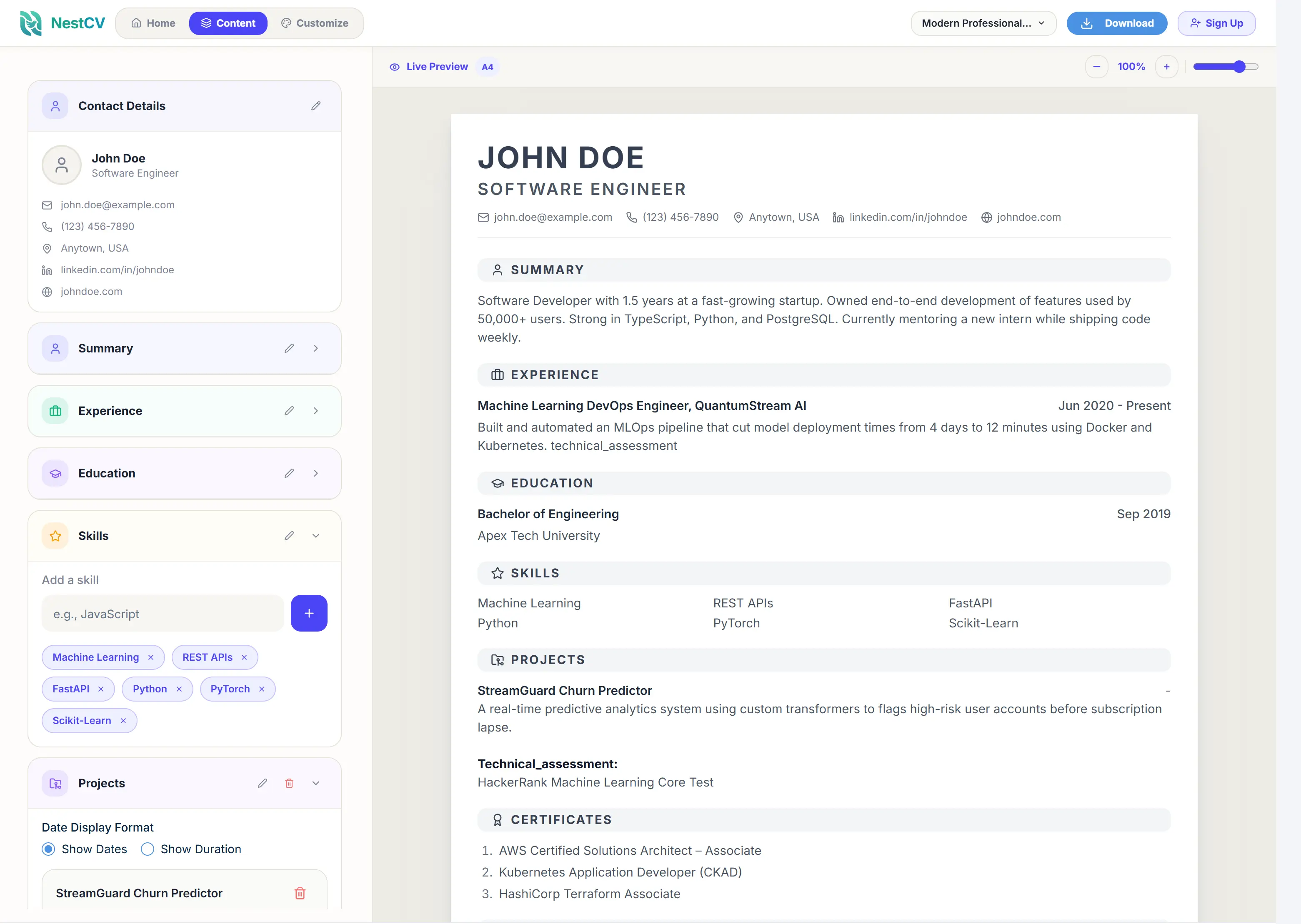
A live preview editor lets you see every change as you make it, so formatting issues appear in the editor rather than in the final PDF. Orphaned lines, awkward spacing, or a section that runs onto a second page are easy to catch and fix in real time. NestCV's live preview works alongside its built-in ATS scanner, which surfaces specific, actionable feedback while you're still editing.
Start Building Your Resume Now — Free
Choose from 20+ ATS-friendly templates, fill in your details, and download your resume PDF in minutes. No sign-up. No credit card. No watermark.
Build My Resume FreeCommon Free Builder Problems and How to Fix Them
If you've used a free resume generator before and run into problems, you're not alone. These issues come up consistently, and most have straightforward fixes once you know the cause.
Broken formatting and font substitution
Formatting breaks when a builder uses text boxes, tables, or custom fonts that don't embed cleanly into the exported file. The fix: switch to a minimal single-column template, use system-safe fonts like Arial, Calibri, or Helvetica, and verify the export by opening it in a real PDF viewer. Confirm the text is selectable and copy-pasteable — if it isn't, you have an image-based export that won't parse in ATS.
Missing sections blocked by a paywall
Some builders on free plans won't let you add certifications, projects, volunteer experience, or publications without upgrading. If you need those sections, move to a builder that allows full custom section editing on its free tier. NestCV doesn't gate sections behind a paid plan, so you can build a resume that reflects your full experience without hitting a wall mid-build.
Blank sections leaving dead space
Blank sections that don't collapse automatically create dead space that makes a resume look unfinished. Before you export, remove or hide any section you're not using to keep the layout clean and intentional.
Exporting a Clean, Print-Ready PDF
A solid resume built on a good template still needs a clean export to be useful. A good PDF renders as selectable text, not a scanned image, and preserves your fonts, spacing, and margins. It should also arrive without any watermark or builder branding.
What to check in your PDF before you send it
Running an ATS scan as the final step before downloading
Think of the ATS scanner as a pre-download quality check. NestCV's built-in scanner returns specific feedback on missing keywords, thin work experience descriptions, and formatting signals that might trip up automated screening. The sequence to follow: edit your content in the live preview, run the ATS scan, make the suggested improvements, then export the final PDF. Downloading first and scanning second means you may need to export again after making changes.
Sharing Your Resume with a Free Live CV Link
A downloadable file isn't always the most practical format for every situation. Freelancers, networkers, and professionals who apply through portfolio-based platforms often need something they can share instantly, without asking the other person to open an attachment.
Why a shareable URL beats an email attachment in several situations
A live CV link updates in real time — when you improve your resume, the link automatically reflects the changes without requiring you to resend anything. It opens on any device without a PDF viewer. It fits cleanly into an email signature, a LinkedIn profile, or a client proposal. And it signals a level of digital fluency that a plain attachment doesn't convey.
Real-world example
A freelancer includes a NestCV live link in a client proposal instead of attaching a file. The client clicks through to an up-to-date, professionally presented profile. No download required, no outdated version on file. That kind of frictionless presentation matters when someone is making a quick decision.
How to claim your NestCV link and start applying today
NestCV states that claiming a personalized nestcv.com URL requires no account creation and no payment. Once your resume is built in the editor, the live CV page is ready to share. Include the URL in your email signature, networking messages, freelance platforms, or anywhere you'd want someone to view your credentials on demand.
Putting It All Together
The core process comes down to a few decisions made early. Choose a genuinely free builder that doesn't lock the download behind a paywall. Build your resume with ATS-friendly content and a clean, appropriate template for your industry. Export a verified PDF, then share it with a personalized live link when the situation calls for it.
The gap between a resume that passes automated screening and one that doesn't is almost never about qualifications. It's usually about formatting choices, keyword alignment, and export quality — all solvable problems that don't require a paid subscription.
For reliable, no-cost support throughout that process, NestCV offers free resume builder help at every stage: live preview editing, a built-in ATS scanner, watermark-free PDF export, and a shareable live CV link. Pick your template from the resume templates free collection and start building today.
Frequently Asked Questions
What is the fastest way to build a professional resume for free?
Do free resume builders actually pass ATS screening?
What should every resume section include?
Is it safe to download a resume PDF from a free builder?
What is a live CV link and do I need one?
How do I know if my resume keywords match the job description?
Ready to Build Your Free Professional Resume?
Choose from 20+ ATS-friendly templates, add your information, and download your resume in minutes. 100% free — no account, no credit card, no watermark.
Build My Resume for Free