
In This Guide
- Over 98% of Fortune 500 companies use ATS software to filter resumes before a human sees them.
- The most common reason resumes get rejected by ATS is formatting — not missing qualifications.
- Use the exact keyword phrasing from the job posting, not synonyms or abbreviations.
- Standard section labels like "Experience," "Education," and "Skills" parse better than creative alternatives.
- A well-optimized resume gets past the bots and still reads naturally to the hiring manager.
You have spent months upskilling, your portfolio is pristine, and you are objectively the perfect candidate for the role. You hit submit, wait three weeks, and receive a cold, automated rejection email sent at 2:14 AM on a Sunday. A human being never even looked at your name.
This is the brutal reality of the Applicant Tracking System (ATS). Over 98% of Fortune 500 companies—and roughly 75% of all modern businesses—use an ATS to filter the avalanche of applications they receive. If your resume format is unparsable, or if you lack the specific algorithmic triggers the system demands, you are instantly disqualified. But here is the good news: an ATS is just a piece of software. It follows rigid, predictable rules. Once you understand the underlying mechanics of how it parses, ranks, and displays data, beating it becomes a trivial exercise. If you are considering using modern generative tools to draft content, read our evaluation on AI resume writing tools vs human authenticity.
What Happens After You Hit Submit (The ATS Journey)
The biggest misconception about an ATS is that it is an artificial intelligence actively judging your morality and work ethic. It is not. It is largely a sophisticated text-scraper. Here is the exact journey your file takes the millisecond you hit "Upload":
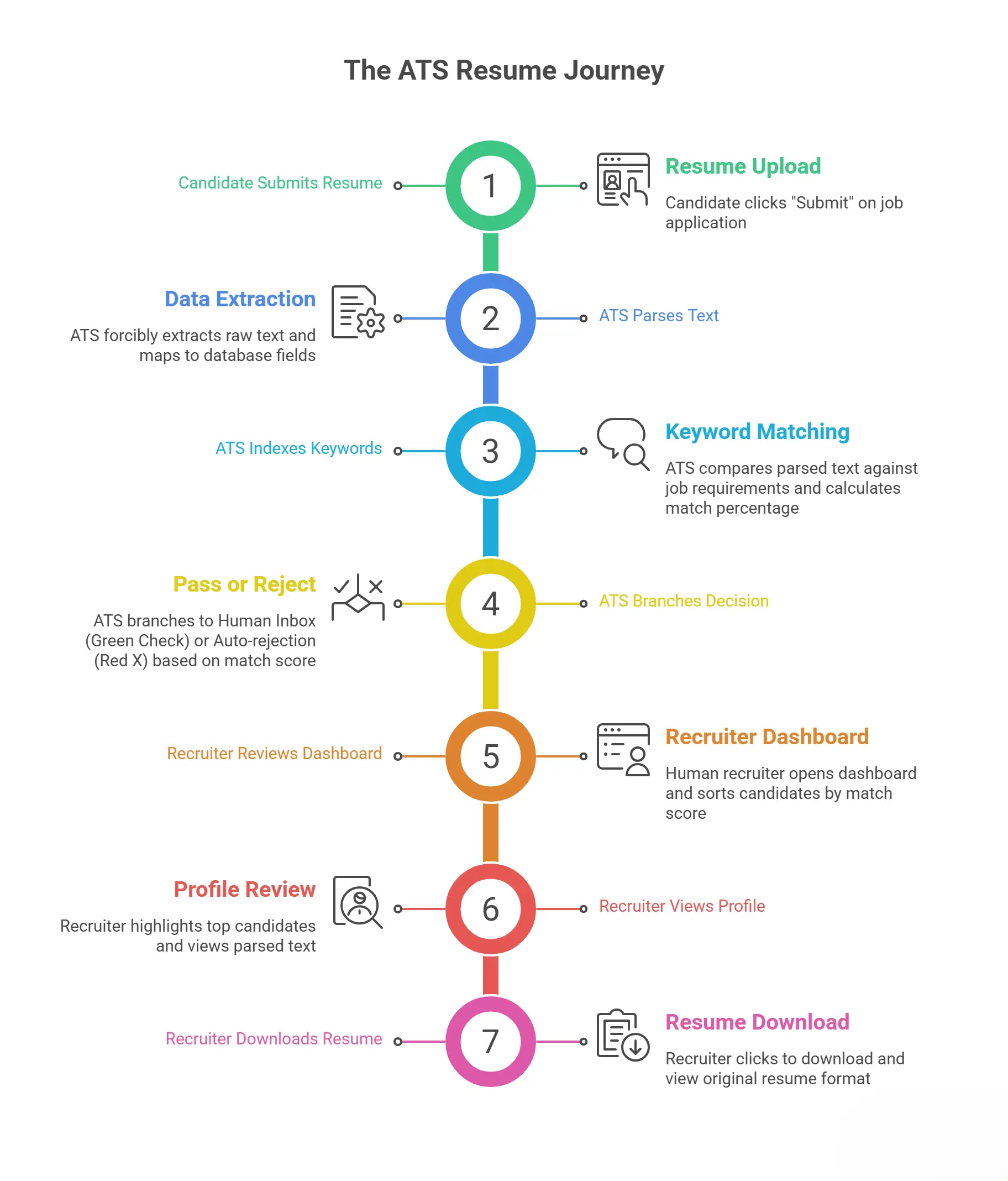
1 Phase 1: The Ingestion & Parsing
The system forcibly extracts the raw text from your PDF or Word document. It violently strips away your beautiful fonts, margins, columns, and colors. It then attempts to map that raw text into rigid database fields (First Name, Email, Job Title 1, Details 1, Degree). If you used a two-column design, the parser reads left-to-right across the entire page, merging your 'Skills' column directly into the middle of your 'Experience' sentences. The result is unreadable gibberish.
2 Phase 2: Indexing and Keyword Scoring
The ATS compares your parsed text against the specific parameters set by the hiring manager. It looks for "Hard Skills" (Python, P&L Management, Node.js), specific job titles, and degree requirements. It calculates a "Match Percentage." If the benchmark is 75% and you score 72%, you are relegated to the bottom of the virtual pile.
3 Phase 3: The Recruiter Dashboard View
A human recruiter opens the dashboard on Monday morning. They do not see 400 beautifully designed PDFs. They see a rigid spreadsheet interface sorted by 'Match Score'. They highlight the top 15 candidates and click to view their profiles. The system shows them the parsed text first. Only if the parsed text looks intriguing will they click the button to download and view your original generated resume format.
The Top 5 ATS Systems (And Their Quirks)
Not all systems are built equally. A resume that passes smoothly through a modern startup's ATS might completely crash the legacy system of a massive banking institution. If you glance at the URL when you apply, you can often identify the enemy you are facing:
Greenhouse & Lever
The modern darlings of the tech industry. Highly intelligent, excellent at parsing PDFs, and very forgiving of modern fonts. They rank heavily on exact skills matching.
Workday
The ubiquitous corporate titan. It famously forces you to manually type your entire resume right after you upload the PDF. Its parser is notoriously brittle—if you don't use standard headings like 'Experience', it breaks.
Taleo (Oracle)
A massive, aging system used by legacy enterprises. It hates columns, it hates PDFs with text-boxes, and it is ruthlessly strict on date formatting. Use extremely conservative layouts here.
iCIMS & BambooHR
Popular in mid-market companies. Very reliant on "knockout questions." If it asks if you require sponsorship and you check yes, a rule may auto-archive you immediately.
Common ATS Myths... Debunked
| The Widespread Myth | The Technical Reality |
|---|---|
| "The ATS automatically rejects me if it doesn't like my resume." | The ATS isn't sentient. It creates a ranked list. A human recruiter decides where to draw the "cut-off" line on that list based on time constraints. |
| "I should paste the entire job description in white text at the bottom to guarantee a 100% match." | Instant termination. The ATS extracts all text and presents it in a uniform color to the recruiter. They will instantly see your massive wall of stolen text and reject you for dishonesty. |
| "If I use complex formatting, it shows I am a creative professional." | Complex formatting proves you don't understand how databases work. Only use wild formatting if you are emailing a PDF directly to an Art Director. |
| "The ATS will penalize me if my resume is two pages long." | The software does not care about page count. It just scrapes data. However, a human will get annoyed if your experience drags on for three pages without impact. |
Stop Fighting The System
You shouldn't need a computer science degree to upload a resume. Our platform generates resumes written in the exact XML/PDF structures that Taleo and Workday crave.
Generate an ATS-Approved ResumeThe 5-Step Formula for an Unbreakable ATS Resume
Now that you understand the enemy, here is exactly how you beat it. Follow these steps sequentially:
1. Ruthless Keyword Echoing
You must 'echo' the exact vocabulary used in the job description. Targeting specific keywords from the posting ensures your resume scores high during algorithmic indexing. If the posting asks for an expert in "Client Relationship Management", do not write that you are great at "Customer Service." The algorithm does not understand nuance—it searches for exact matching text strings.
2. Enforce Strict Standard Headings
The parsing algorithm identifies blocks of text based on specific heading triggers. Do not try to be clever.
✓ Approved Triggers
- "Work Experience"
- "Education"
- "Skills" or "Technical Skills"
- "Certifications"
✕ Fatal Errors
- "My Journey"
- "Where I Learned"
- "What I Bring to the Table"
- "Trophies & Badges"
3. Abolish Complex Visual Assets (Use Simple Formatting)
Graphics are the kryptonite of ATS databases. Sticking to simple formatting with a clean single-column hierarchy is essential. Remove your headshot, tiny phone icons, and skill progress bars. If the system attempts to parse graphics or multi-column grids, it generates unreadable Unicode artifacts across your candidate profile.
4. Standardize Your Date Formats
One of the primary calculations an ATS performs is "Total Years of Experience." If your dates cannot be read by a machine, it assumes you have zero years of experience.
Standard Alpha
August 2021 - Present
Standard Numeric
08/2021 - 12/2024
5. Save as a Clean PDF
Unless explicitly instructed by the posting to upload a .docx file, always generate your final output as a PDF. However, you must ensure it is a "text-based PDF" (like the ones generated by our system or Microsoft Word), not an "image-based PDF" (like a scanned photo of a piece of paper). If you can highlight the text in your PDF with your mouse, an ATS can read it.
The Final Pre-Flight Checklist
Before you ever click "Submit Application," physically verify these metrics:
- Is the entire layout strict single-column?
- Are headings standard (Experience, Education, Skills)?
- Have I injected 4-6 high-priority hard skills from the job description?
- Are all icons, images, and progress bars violently removed?
- Are my dates formatted cleanly and continuously?
- Is my file named professionally (e.g., Jane_Doe_Resume_2026.pdf)?
The Final Strategic Advantage
Understanding the ATS is a superpower. Every day, highly talented people are eliminated from contention simply because they chose a pretty layout over a functional one.
By using standard nomenclature, eradicating columns, and relentlessly echoing their own vocabulary back to them, you ensure your resume slides perfectly through the digital perimeter and lands on a recruiter's desk. Combine this technical structure with highly potent action verbs and compelling achievements, and your interview rate will skyrocket.
Beat the Bots. Get the Interview.
Our platform generates PDF structures proven to pass Workday, Taleo, Greenhouse, and Lever flawlessly. Focus on your career; let us handle the algorithms.
Execute Your ATS Resume Now