
What You'll Learn
- The most common resume mistakes in 2025 are still the same ones — weak bullet points and poor formatting.
- Listing duties instead of achievements is the number one reason resumes get ignored.
- A photo, marital status, or age should never appear on a resume in North America.
- Applying to hundreds of jobs with the same generic resume is a waste of time.
- One typo or formatting inconsistency can cost you an interview — always proofread twice.
Your resume might look fine to you – but hiring managers and ATS systems see different problems. According to a 2024 CareerBuilder survey, 75% of qualified candidates are rejected due to resume mistakes. Understanding how to write a resume correctly means avoiding these pitfalls. Don't let avoidable errors cost you your dream job.
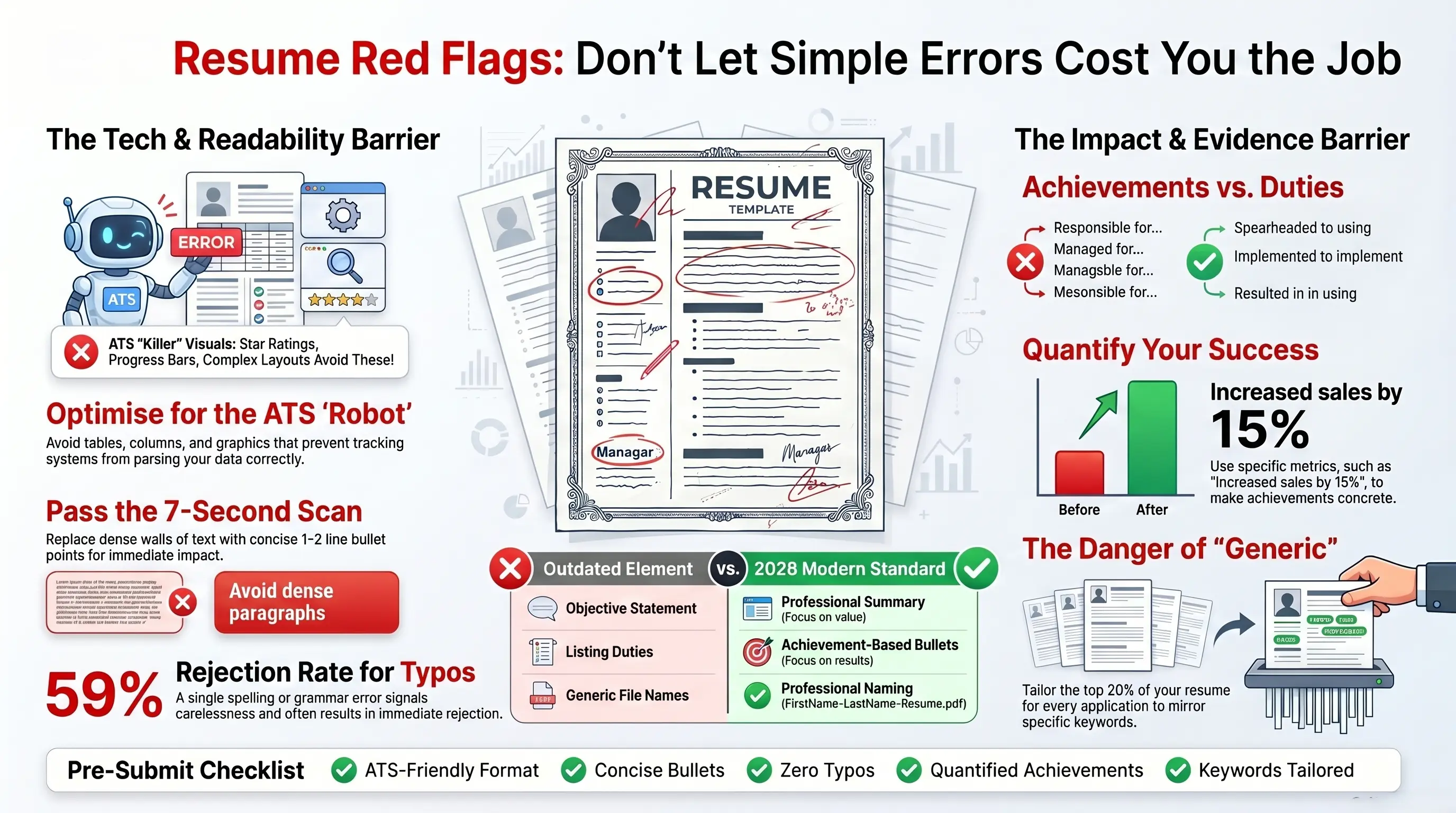
Mistake #1: Typos and Grammar Errors
It sounds obvious, but 59% of recruiters will reject a resume for a single typo. Spelling errors signal carelessness – and if you can't proofread your resume, why would an employer trust you with important work?
🔴 Real Examples We've Seen:
- "Manger" instead of "Manager" (very common!)
- "Responsible for pubic relations" (meant "public")
- "Detail-oriented professional with experience in costumer service"
- "I increased sells by 30%" (sales)
- "Exceptional comunication skills"
✅ How to Fix It:
- Use spell-check, but don't rely on it alone (it won't catch "manger")
- Read your resume out loud – you'll catch errors your eyes skip
- Have 2-3 people proofread it fresh (you're blind to your own errors)
- Read it backwards sentence by sentence to catch errors
Mistake #2: Using One Generic Resume for Everything
Sending the same resume to every job is the equivalent of wearing a suit to every occasion – sometimes you need a different outfit. Hiring managers can tell when your resume wasn't written for their specific role.
❌ Generic Summary:
"Hardworking professional seeking new opportunities to grow and contribute."
✓ Tailored Summary:
"Senior Product Manager with 7 years scaling B2B SaaS platforms. Led Agile teams at two hypergrowth startups. Expert in Jira, Figma, and data-driven roadmap prioritization."
✅ How to Fix It:
- Rewrite your summary for each job, emphasizing their top requirements
- Reorder bullet points so the most relevant achievements come first
- Mirror exact keywords from the job description (not synonyms)
Mistake #3: Listing Duties Instead of Achievements
Every sales manager "managed the sales team." But what did YOU accomplish that the next person wouldn't? Duties describe your job; achievements prove you did it well.
❌ Duty (Tells nothing):
- Managed social media accounts
- Responsible for customer service
- Handled employee scheduling
- Participated in sales meetings
✓ Achievement (Proves value):
- Grew Instagram following from 5K to 50K in 8 months, increasing engagement rate by 300%
- Resolved 75+ daily inquiries while maintaining 98% customer satisfaction rating
- Optimized scheduling system reducing overtime costs by $40K annually
- Presented sales strategy to leadership, resulting in 25% quota increase team-wide
The CAR Formula
Transform any duty into an achievement using Challenge → Action → Result. What problem did you face? What did you do? What was the measurable outcome? If you can't measure it, estimate: "reduced by approximately..." is better than nothing.
Mistake #4: No Numbers or Metrics
"Increased sales" is forgettable. "Increased sales by $2.3M (145% of quota)" is memorable. Numbers make your achievements concrete and comparable.
Numbers You Can Add to Almost Any Resume:
- Revenue/sales generated ($)
- Cost savings ($)
- Time saved (hours/days)
- Team size managed (#)
- Projects completed (#)
- Customer satisfaction (% or rating)
- Efficiency improvement (%)
- Error reduction (%)
- Users/customers served (#)
- Budget managed ($)
Build a Mistake-Free Resume
Our free resume builder helps you avoid common errors with professional templates and helpful guidance. Choose from 20+ designs.
Create Your Resume FreeMistake #5: Poor Formatting and Layout
A cluttered, hard-to-read resume gets tossed – even if your experience is perfect. Recruiters scan; they don't read. Make your resume scannable or get skipped.
❌ Formatting Sins:
- Walls of text with no bullet points
- Inconsistent fonts and sizes
- Margins under 0.5 inches
- More than 2 pages (unless 15+ years experience)
- Tiny font (under 10pt) to cram content
- Creative section names ("My Journey" instead of "Experience")
✓ Clean Formatting:
- 3-5 bullet points per role
- Consistent 1-2 professional fonts
- 0.5-1 inch margins all around
- One page for most candidates
- 10-12pt font for body text
- Standard section headings ATS can parse
Mistake #6: Not Optimizing for ATS
In 2026, over 99% of Fortune 500 companies use Applicant Tracking Systems. If your resume isn't ATS-friendly, it might never reach human eyes.
🔴 ATS Killers:
- Tables and columns: ATS often reads them in wrong order
- Text boxes: Content may be invisible to ATS
- Headers/footers: Contact info here often gets lost
- Graphics and images: Can't be parsed, might confuse formatting
- Fancy fonts: Some don't render, causing parsing errors
- PDF from design software: May not be text-extractable
✅ ATS-Friendly Practices:
- Use standard section headings: "Experience," "Education," "Skills"
- Match exact keywords from the job posting (not synonyms)
- Save as .docx for ATS, .pdf for humans when you can submit both
- Use standard fonts: Arial, Calibri, Times New Roman, Garamond
Mistake #7: Unprofessional Contact Information
Your email address and online presence are part of your first impression. Don't let an old email or missing LinkedIn sabotage you.
❌ Unprofessional:
- sexyguy2005@yahoo.com
- partyanimal420@gmail.com
- princess_sparkles@hotmail.com
- johns_email@aol.com (outdated)
- No LinkedIn or portfolio link
✓ Professional:
- john.smith@gmail.com
- jsmith.marketing@gmail.com
- sarah.johnson@outlook.com
- LinkedIn: linkedin.com/in/sarahjohnson
- Portfolio: sarahjohnson.design
Mistake #8: Including Everything
Your resume isn't an autobiography. Including irrelevant jobs, ancient experience, or personal details clutters your message and wastes precious space.
🔴 Leave These Off Your Resume:
- Age, marital status, nationality: Illegal for employers to consider in US
- Photo: Unless required (modeling, acting) or standard in your country
- High school: If you have a college degree
- Jobs from 15+ years ago: Unless highly relevant
- "References available upon request": Outdated, wastes space
- Hobbies: Unless directly relevant ("Chess champion" for strategy roles)
- Microsoft Office: Assumed in 2026 (unless specifically requested)
- Objective statement: Replaced by professional summary
7 More Mistakes That Kill Resumes
Mistake #9: Wrong File Format
Mistake #10: Generic File Name
Mistake #11: Lying or Exaggerating
Mistake #12: Missing Keywords
Mistake #13: Passive Language
Mistake #14: Ignoring the Cover Letter
Mistake #15: Not Proofreading After Changes
Pre-Submit Checklist
Run through this checklist before submitting ANY application:
- Spell-checked and proofread by at least one other person
- Tailored summary mentions this specific job's requirements
- All bullet points start with strong action verbs
- Achievements include numbers/metrics where possible
- Keywords from job posting are included naturally
- Contact info is professional and complete
- File is named professionally (FirstName-LastName-Resume.pdf)
- Saved as PDF (or .docx if they prefer)
- One page (or two if 10+ years of relevant experience)
- Clean formatting with consistent fonts and spacing
- No tables, text boxes, or graphics (ATS-friendly)
- Cover letter included if requested
Frequently Asked Questions
How many resume mistakes are considered automatic rejections?
Is it really that bad to use the same resume for every job?
What's the biggest mistake people make on resume bullet points?
Should I include a photo on my resume in 2026?
How old is 'too old' to include on a resume?
What if I genuinely have no metrics to quantify my work?
Is a two-page resume ever acceptable?
The Bottom Line
Most resume mistakes are completely avoidable with a little attention to detail. The 15 mistakes covered here account for the vast majority of resume rejections. Fix them, and you'll already be ahead of most applicants. Make sure to also check out our ATS optimization guide.
Remember: your resume's job is to get you an interview, not to tell your life story. Keep it clean, relevant, quantified, and tailored to each job – and you'll start seeing more calls back. Use strong action verbs throughout.
Create a Perfect Resume Today
Avoid all these mistakes with our free resume builder. Professional templates, ATS-friendly formatting, and built-in guidance included.
Create Your Resume Free